

Approve a publication
Require a second person to approve each published version, then request, approve or decline a publication.
Use approval when a second person should check every change before visitors see it. One person asks to publish, and another approves.
Turn on approval#
- Open Settings.
- Under Behaviour, turn on Require a second person to publish forms.
- Choose Save settings.
The setting covers every form in the project.
Request a publication#
- Open Consent forms and select the form.
- Choose Publish version N at the top.
- Fill in What changed and your choice for people who answered earlier.
- Choose Publish version N to confirm.
The console does not publish. It records a request with your note and your choice, and tells you it was sent for approval. The form shows who asked, for example Waiting for approval, requested by Ananya Rao.
Any edit cancels the request
Saving the form's draft again withdraws a request that is waiting. Publish again to send a new one.
Approve or decline#
Another person with access to the project does this. You cannot approve your own request, and the console refuses it if you try.
- Open Consent forms and select the form. The top of the form shows Waiting for approval.
- Read the draft and check the preview. Approving publishes the draft as it stands at that moment.
- Choose Approve and publish, or choose Decline to turn the request down.
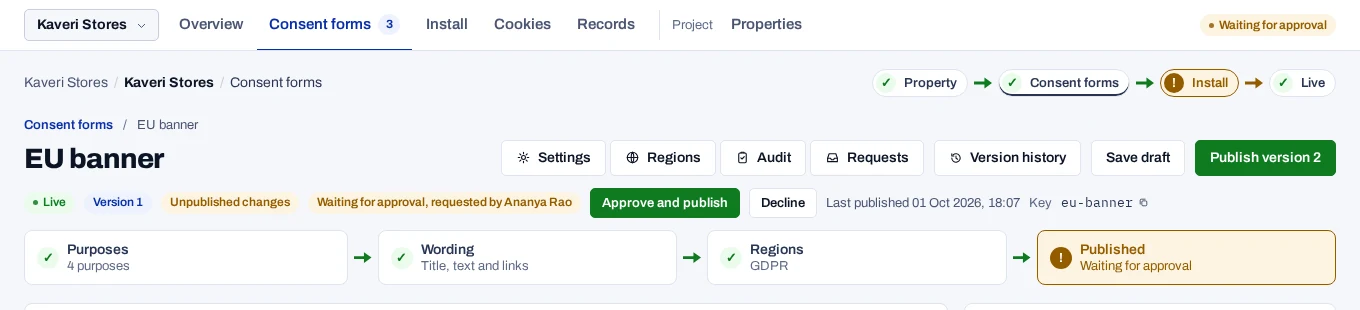
After approval the form shows Live and the new version. The version's note in the history names both people, for example Requested by Ananya Rao, approved by Vikram Nair.
Decline removes the request and leaves the draft as it is. The person who asked can use it too, to cancel their own request.
The checks for India and for the banner layout run when the request is approved. A missing item is reported then, not when the request is sent. See Fix a refused publication.