

Log a request
Add a rights request that reached you by email, phone, post or a support ticket, so its deadline is tracked with the others.
Log a request when it reaches you by email, phone, post or a support ticket. Log it the day it arrives, because the deadline starts from the moment you log it.
Before you start#
Check who the person is. A logged request has no confirmation link, so nobody else checks.
Log the request#
- Open Properties and choose Requests.
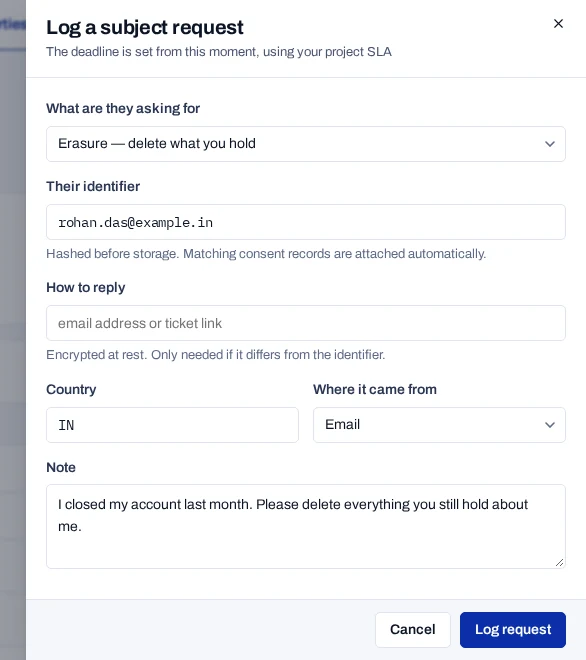
- Choose Log a request.
- Under What are they asking for, choose the request type.
- Under Who is asking, keep The person themselves, or choose a parent, a lawful guardian or a nominee.
- Under Their identifier, type the email address, user id or cookie id the person is known by.
- If the reply should go somewhere else, fill in How to reply with an email address or a ticket link.
- Fill in Country with a two-letter code, such as
IN. Under Where it came from, choose how the request arrived. - Under Note, write what the person asked for, in their words.
- Choose Log request.
When someone asks for another person, the drawer also asks for Their own name and Their own email address or phone number. See Handle a request made for someone else.
The console says Request logged. The request joins the list with a
reference, such as DSR-2026-4F2A91, and a deadline. The consent records
found for the identifier are attached to it.
The identifier is hashed before it is stored. The reply address is encrypted.
Choose the request type#
A deployment for India offers only the rights the DPDP Act gives: access, erasure, withdrawal, correction, nomination and grievance. Portability, objection and restriction appear only when the operator sets PRODUCT_SCOPE=global.
| Type in the console | Use it when the person wants |
|---|---|
| Access — a copy of what you hold | A copy of their data. |
| Portability — a machine-readable export | Their data in a portable format. |
| Erasure — delete what you hold | Their data deleted. |
| Withdraw consent | To take back their consent. |
| Objection — stop a particular processing | One use of their data to stop. |
| Rectification — correct something wrong | Their data corrected, completed or updated. |
| Restriction — pause processing | The use of their data paused. |
| Nomination — someone to exercise their rights if they die or lose capacity | To name a person who can act for them. See Record or cancel a nomination. |
| Grievance — a complaint about how data is handled | An answer to a complaint. |
If something goes wrong#
| What you see | What to do |
|---|---|
| An identifier is needed to find what is held | Fill in Their identifier, then choose Log request again. |
| Enter the name of whoever is asking for the person | Fill in Their own name. |
| A nominee must give the email address or phone number they were nominated with | Fill in Their own email address or phone number. |
| A nominee cannot make or change a nomination | Log it as asked by the person, a parent or a guardian. |
| None found in the Records column | Your site may keep the person under another identifier. Link your identifier. |