

Handle a request made for someone else
Log a rights request from a parent, a lawful guardian or a nominee, record the document you checked, then carry the request out.
A parent can ask for their child. A lawful guardian can ask for the person in their care. A nominee can ask for someone who has died or cannot act. Check their authority, record what you checked, then carry the request out.
Who can ask for someone else#
| Who is asking | What your team checks, for example |
|---|---|
| A parent, for their child | That the person asking is the child's parent, such as from a birth certificate. |
| A lawful guardian | The guardianship order of a court, a designated authority or a local level committee. |
| A nominee, after death or incapacity | A death certificate or proof of incapacity. The person must have named this nominee first. |
Your team decides what is enough. The product records what you confirmed. It makes no finding of its own.
Log the request#
A person can choose Who is making this request? on the hosted request page. To log a request that reached you another way:
- Open Properties, choose Requests, then Log a request.
- Under Who is asking, choose the parent, guardian or nominee.
- Under Their identifier, type the identifier of the person the data is about, not of the one asking.
- Fill in Their own name for the person asking.
- Fill in Their own email address or phone number. A nominee must give the one they were nominated with.
- Choose Log request.
The request shows Authority to confirm. Until then, the panel says Can be completed once their authority is confirmed.
Confirm their authority#
- Open the request. Find the Authority to act panel.
- For a nominee, check Registered nominee. It must say The email address or phone number given matches.
- For a nominee, choose Why the nominee acts: The person has died or The person cannot act.
- Under Document checked, choose the file you checked. Or paste its SHA-256.
- Under What you checked, write what you saw, such as the court and date of an order.
- Choose Confirm authority.
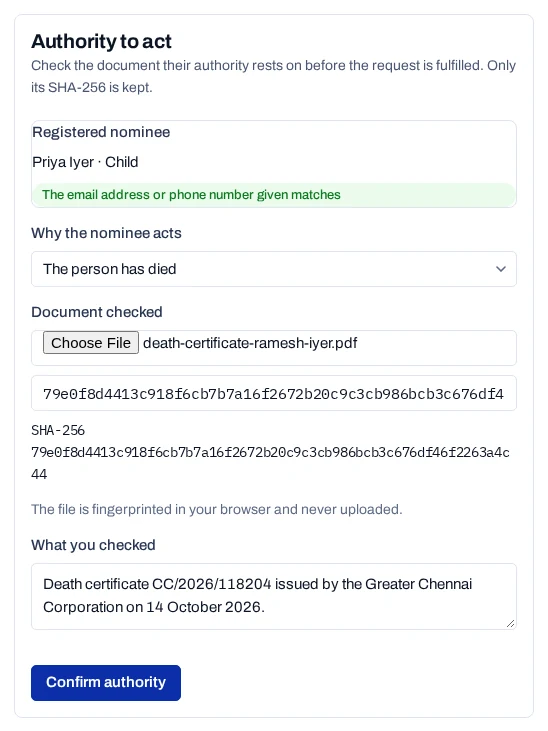
The file is fingerprinted in your browser and never uploaded. The request now shows Authority confirmed. Carry it out as in Handle a request.
What is kept#
- The person's identifier and the one asking are kept only as keyed hashes. The name of the one asking is encrypted.
- Your check is kept as the document's SHA-256, your note, who confirmed it and when. It also goes on the request's Handling record.
- Each later change carries who acted. A withdrawal or erasure for the
request seals
actingAsinto the consent record's history, with the request's reference and the document's SHA-256. The record shows Last change asked for by.
The consent.withdrawn and subject.erased webhooks carry the same
actingAs. See People events.