

Record or cancel a nomination
Record the nominee a person names in a nomination request, change or cancel the nomination later, and see where it shows.
Under India's DPDP Act, a person can name a nominee to use their rights if they die or cannot act. Record the nominee from the person's nomination request. One nomination is in force for each person at a time.
Record the nominee#
The person asks with a Nomination request, on the hosted request page or through your team.
- Open Properties and choose Requests. Open the nomination request.
- In Their nomination, fill in Nominee’s name.
- Choose the Relationship to the person.
- Fill in Nominee’s email address or phone number. The nominee gives the same one when they act later.
- Write your answer under Reply to the person.
- Choose Record nominee.
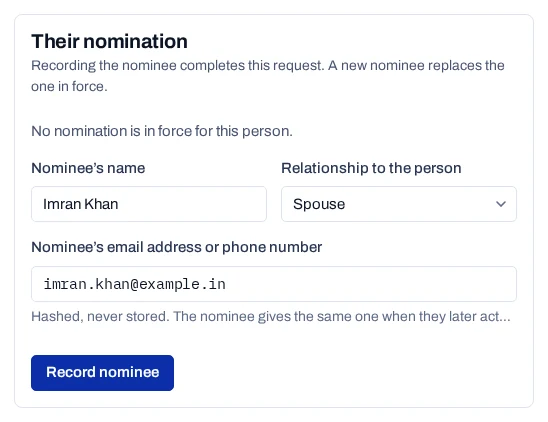
The console says Nominee recorded, and the request is completed. The name is encrypted. The email address or phone number is kept only as a keyed hash. A nomination request has no Mark completed button: recording or cancelling the nomination completes it.
A request from the hosted page needs Identity confirmed first.
Change or cancel a nomination#
To change the nominee, record a new one from a new nomination request. The console shows Record the new nominee, and the earlier nomination ends.
To cancel from a request:
- Open the nomination request.
- Under Or cancel the nomination: why, write the reason.
- Choose Cancel the nomination.
To cancel without a request, for example after a phone call you have checked, search for the person in Records. Under Their nomination, choose Cancel, give the reason and choose Cancel the nomination.
When the nominee acts#
The nominee makes a request for the person, as a nominee. Their email address or phone number must match the one recorded. See Handle a request made for someone else.
Where the nomination shows#
- Records, when you search for the person: Their nomination, with In force or Cancelled.
- The record panel's Details, under Nominee.
- The access export, under
nominations: the name, relationship, status, dates and the request reference.