

Read a record
Open one consent record and read what the person agreed to, when, on which form, and whether its proof is intact.
Open a record to answer two questions: what did this person agree to, and can you prove it? A record is one person's answer to one form. Later changes, such as a withdrawal, are added to the same record.
Open the record#
- Open Records. The page lists the live records of the property you have selected, newest first.
- To find one record, type its consent ID, which starts
cns_, or its proof hash in Find a person or a record. Choose Find. - Click the row. The Consent record panel opens.
- Read the summary and the proof verdict at the top.
- Read What they decided. Each purpose shows Allowed, Declined or Partly allowed.
- Read What happened for the history of the record, oldest step first.
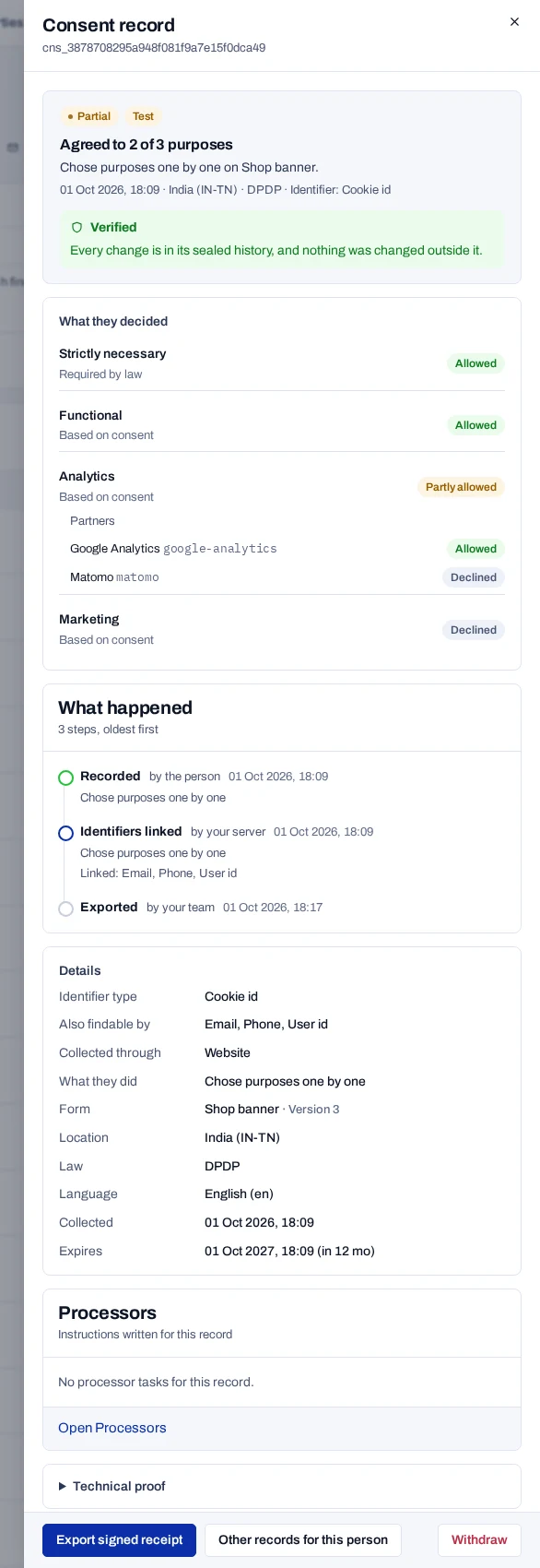
Partly allowed means the person allowed the purpose and declined at least one of its partners. Each purpose also shows its category and its basis, such as Based on consent.
Read the summary#
The summary gives the answer in words, such as Agreed to 3 of 5 purposes, then how, where and when it was given.
| Status | Meaning |
|---|---|
| Granted | The person allowed every optional purpose. |
| Partial | The person allowed some optional purposes and declined others. |
| Denied | The person declined every optional purpose. |
| Withdrawn | The person, or your team, withdrew the consent. |
| Expired | The answer reached the end of its life. |
| Pending | The person has not yet confirmed an email opt-in. |
A Test badge marks a record written with a test key. Test records are not evidence, and they are deleted 30 days after their last change. An Identifiers erased badge marks a record whose identifiers were erased.
Check the proof#
The summary ends with the proof verdict. Hover over it to read the reason. Proof chain, under Technical proof, gives the same result.
| Verdict | Proof chain | Meaning |
|---|---|---|
| Verified | Chain verified · keyed | Every change is in the sealed history, and nothing was changed outside it. All seals are keyed. |
| Verified | Chain verified | The same, but some events were sealed before chains were keyed. |
| Cannot be checked here | Key not held here | This deployment does not hold the key that sealed an event. |
| Changed outside its recorded history | Chain broken | An event does not follow the one before it, or the record no longer matches its seal. Do not rely on it. |
Read the rest of the record#
What happened names each step, such as Recorded or Withdrawn, with who acted, such as by the person or by your team, and when.
Details lists the facts behind the answer, such as the kind of identifier, the form version, the law and the dates. It never shows the identifier itself. For consent brought in from earlier, it adds the basis, the notice reference and Imported from. Nominee names their nominee. Last change asked for by names a parent, guardian or nominee whose request made the latest change.
How consent was taken appears when your server sent how a branch, a call or a paper form took the consent. Attested by staff means the person did not confirm it themselves. Data your site attached is hidden once the person is erased. Processors lists the stop and erase tasks written for the record.
Technical proof is folded. It holds the hashes, such as the Proof hash.
Act on the record#
- Export signed receipt downloads a copy anyone can verify.
- Other records for this person lists the records kept under the same identifier, live and test. Linked identifiers are not followed.
- Withdraw ends the consent.