

Send a notice to existing customers
Send one published notice to people who consented before the DPDP Act, through your own mailer or SMS system, and keep proof of who was sent it.
A notice campaign gives each person on your list a single-use link to one published notice. Your own mailer or SMS gateway sends the links. The product sends no messages, and records who was sent which version and who answered.
Before you start#
- A published notice form whose version is the wording you want people to read.
- A CSV file of the people, one per row, or a finished import.
- Your counsel has read the page wording and chosen the mode and basis with you.
Wording awaiting legal review
The words around your notice, the two buttons and the lines under them, are a neutral default that counsel has not yet reviewed. Have your counsel read them in each language you send before you issue links.
Create the campaign#
- Open Records and choose Notice campaigns.
- Choose New campaign and name it.
- Under Notice, choose the published version people will see.
- Choose When a person withdraws.
- Open More options to change the Mode, the Default language, the Default basis or Links stay valid for, from 60 to 90 days. Then choose Create campaign.
Mode and Default basis are your labels. In this release both modes show the same page. A person whose basis is No consent on record sees the same two buttons too, and is asked for nothing more. This wording is also for your counsel to review.
Add people#
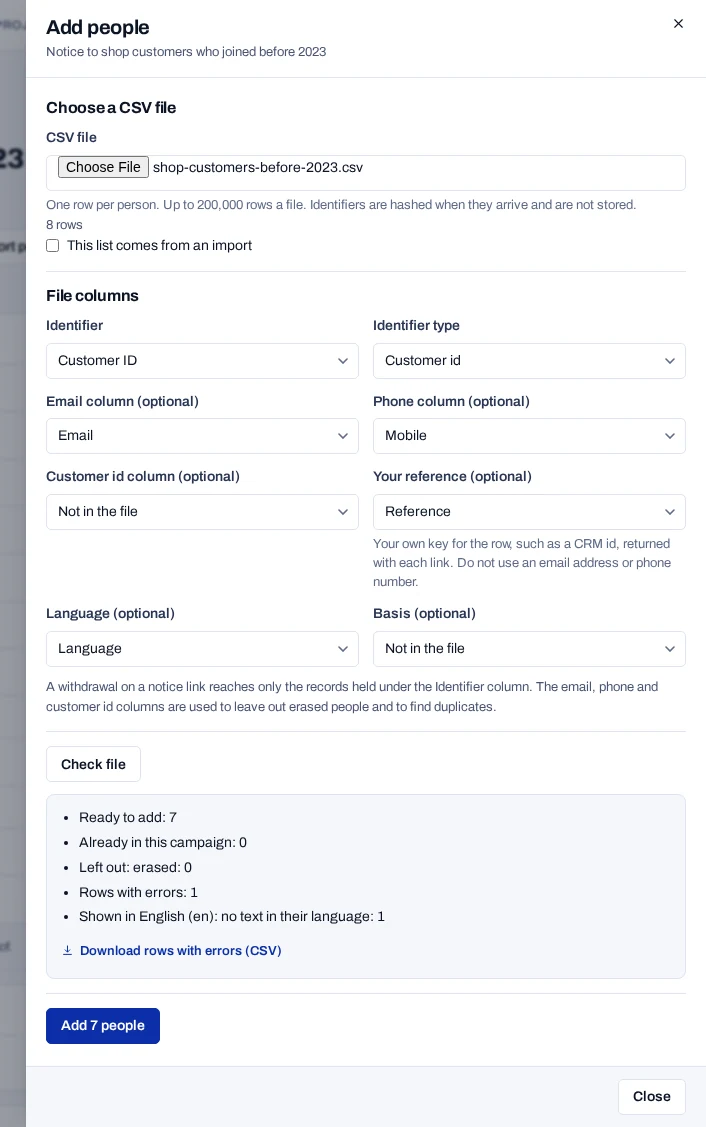
- Open the campaign and choose Add people.
- Choose the CSV file. For a list from an import, tick This list comes from an import.
- Match the Identifier column, and the email, phone, customer id, reference, language and basis columns you have.
- Choose Check file, then Add, the button that names the number of people.
Identifiers are hashed when they arrive and never stored. People you erased are left out. A withdrawal on a link reaches only the records held under the Identifier column. The other identifier columns serve to leave out erased people and to find duplicates.
Issue and download links#
- Choose Issue links and confirm. The notice version and mode are now fixed.
- Wait until the batch shows Ready.
- Under Batches, choose Download links (CSV).
- Hand the file to your sender. Delete it once the messages are sent.
Anyone who holds a link can answer for that person, so keep the file safe. A batch holds up to 100,000 links and can be downloaded for 7 days.
What people see#
The link opens your notice in the person's language, with I have read this notice and Withdraw my consent, of equal weight. Both are optional, and opening the link changes nothing. Each link answers once.
I have read this notice records the answer on the campaign only. It gives and changes no consent. Withdraw my consent withdraws the person's records through the usual path.
One address may open links 300 times in 10 minutes, and use 20 unknown links. People behind one mobile carrier address share these limits.