

Find a person
Search Records by email address, phone number or user id to list every consent record held for one person, across the whole project.
Search for a person when they ask what you hold for them, or before you withdraw or erase their consent. The search covers the whole project, not only the property you have selected.
Search for the person#
- Open Records.
- In Find a person or a record, type the person's identifier, for
example
meera.iyer@example.in. An email address, phone number, user id, cookie id or device id all work. - Choose Find.
- To read a record in full, click its row.
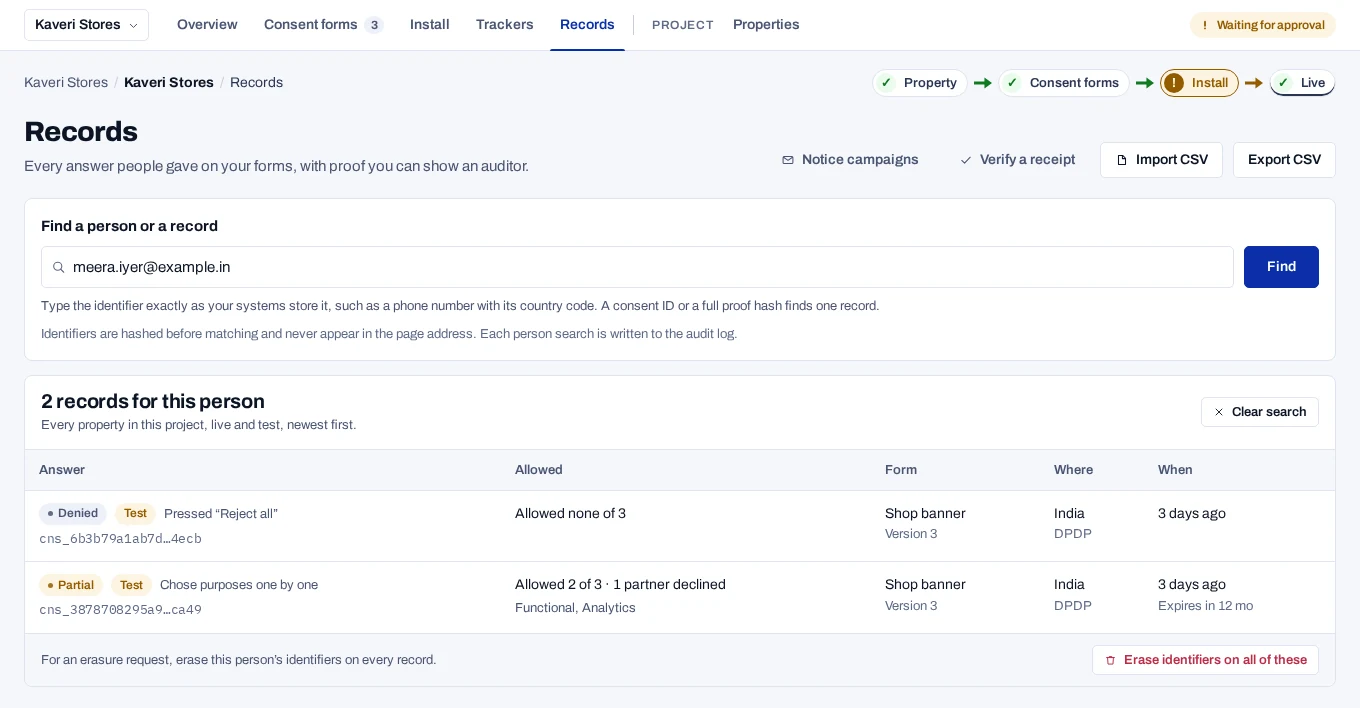
The person's records replace the list, under a title such as 3 records for this person. They come from every property in the project, live and test together, newest first. Test records carry the Test badge. Above 100 records, the page lists the newest 100 and says so, for example Showing the newest 100 of 240.
Export CSV downloads the records listed. To go back to the full list, choose Clear search.
If nothing matches, the page says No records for this person and Nothing matches this exact identifier.
When the person named a nominee, Their nomination appears under their records, with In force or Cancelled. To end a nomination, choose Cancel and give the reason. See Record or cancel a nomination.
How matching works#
- Any linked identifier finds the record. A record is found by the identifier it is kept under, and by any identifier your site linked to it later. A record collected under a device id is also found by the email address, phone number or user id linked to it.
- Every kind of identifier is matched. You do not choose a type.
- Email addresses ignore case. Type any other identifier exactly as your systems sent it, with the same capital and small letters.
- Spaces at the start and the end are ignored.
- What you type is not saved. It is sent in the body of the request, never in the page address, and hashed before matching. The audit log records the search, who made it and the first 12 characters of the hash.
How an identifier is matched
Something that contains @ is tried as an email address, in lower case,
and also exactly as typed. Anything else is tried exactly as typed only.
Other ways to find records#
- A consent ID or a full hash finds records, not people. A value that
starts
cns_, or a 64-character proof hash or subject hash, finds the records that carry it, in every property, live and test. Spaces inside a hash are ignored. When no record has it, choose Search for a person with this value to try it as an identifier. - Anything else is a person's identifier. A phone number typed as digits, or a shorter code, is always searched as a person.
- An open record leads to the others. Other records for this person lists the records kept under the same identifier, in every property, live and test. A Same identifier as chip shows it is on. It does not follow linked identifiers, so search by the identifier to see those too.
If nothing is found#
Your site may keep this person's consent under a different identifier, such as a customer number. Ask your developers which identifier your site sends, then search for that one.
Related#
- Withdraw consent or erase a person
- Read a record
- Handle a request
- Identifiers, for developers