

Preview as a visitor
Check which form, law and language a visitor from any place gets, without touching your site or recording anything.
Check what a visitor from a place sees before real visitors do. Do it after you change a region rule, add a language or edit a form. Nothing is recorded.
Try a visitor#
- Open Consent forms, select the form and choose Regions.
- Find Try a visitor.
- Under A visitor arrives from, choose a country.
- For a country with states or provinces, choose one or leave Any region.
- Under What they see, pick a language above the preview.
To test an address instead of a country, type an IP address and choose Resolve.
The panel names the form that visitor gets and says why. It shows the law, the consent model and the form's version. What they see draws the banner for that visitor.
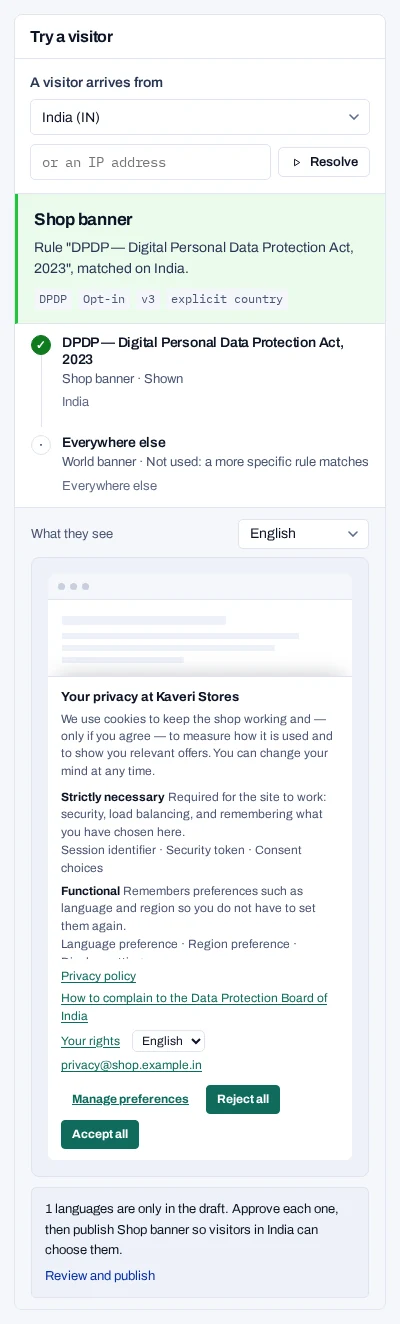
Below, every rule that was considered is listed with its outcome:
- Shown
- Not used: a more specific rule matches
- Would match, but the rule is off
No form is shown means no rule covers the place. A language that is only in the draft is marked as draft.
Try the runtime#
Try the runtime asks the same question your site's snippet asks.
- Open Install and find Try the runtime.
- Enter a country code such as
IN, or a country and subdivision such asUS-CA. - To see a language, enter its code, such as
hi. - Leave Let the region decide, or pick a published form to test it by name.
- Choose Send.
The result names the form, the consent model and the law. It says which rule matched and shows the full response the runtime would get.
No form here means no rule that is turned on covers the place. A form that is not published yet is reported as not published.
Check the look#
To see the banner with your brand on a phone or a desktop, use the preview under the form's Look tab, in Brand, colours and custom code. See Check the real banner.
How location is detected
Choose How location is detected on the Regions page to see the order the runtime uses.
- A country your site passes in is used as it is.
- Otherwise the country header set by your hosting or CDN is used.
- Otherwise the visitor's IP address is looked up. This is less reliable behind a VPN.
- With no location, only Everywhere else can match. Without it, no form is shown.
Developers can also force a place on a real page. See Test your integration.