

Export and import a property
Save a property with its forms, rules and records to one file, and create a new property from that file somewhere else.
An export is one file that holds a property and what is needed to rebuild it. Use it to copy a property to another project, to move to another deployment, or to restore from a file you kept. To bring in consent from another system's CSV file, use Import consent from a file instead.
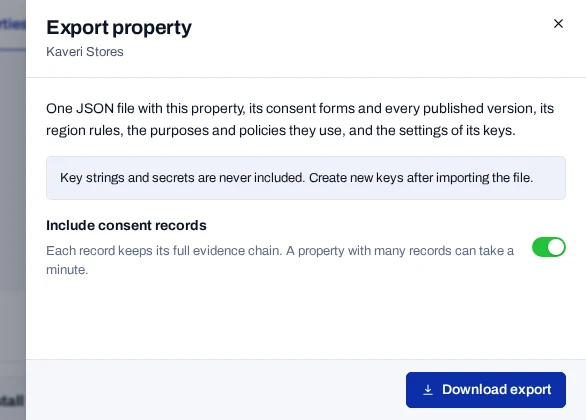
Export a property#
- Open Properties and choose Export on the property's card.
- Leave Include consent records on to take the records too. Turn it off for the set-up only.
- Choose Download export.
The browser downloads a .json file named after the property's key and the date. A property with many records can take a minute.
Treat the file as confidential
An export with records holds consent data about real people. Store it and send it as you would a copy of the database. Each export is written to the audit log.
What the file holds#
| In the file | Not in the file |
|---|---|
| The property, its forms and every published version | Key strings and secrets |
| Region rules, the purposes and policies the forms use, and the processor register | Readable identifiers, IP hashes, browser details and page addresses |
| Key settings: name, test or live, origins and permissions | Project settings, webhook endpoints and rights requests |
| Consent records with their evidence chain, if you chose them | The cookie list, the breach register and the audit log |
Import a property#
An import creates a new property. Nothing that exists is changed.
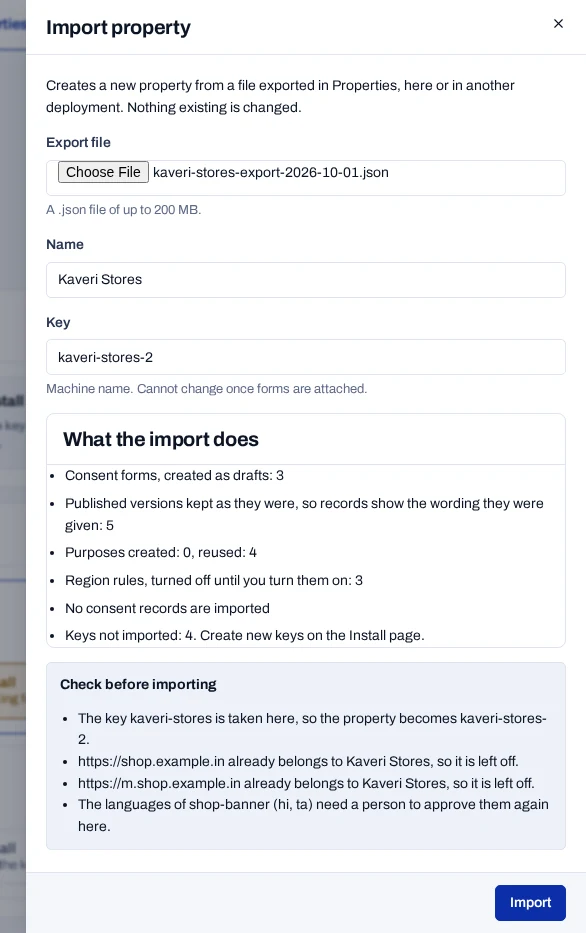
- Open Properties and choose Import property.
- Under Export file, choose the file. It must be a
.jsonfile of up to 200 MB. - Check the Name and the Key in the preview. Change them if you wish.
- Leave Import consent records on to bring the records in, or turn it off.
- Read What the import does and any notes under Check before importing.
- Choose Import.
Nothing is written until you choose Import. The console then opens the new property's Overview. The whole import works or fails as one.
What arrives#
- Forms arrive as drafts. Published versions are kept as they were.
- Region rules arrive turned off.
- Keys and language approvals are not imported.
- A purpose or policy whose key exists in the project is reused, unchanged.
- An origin that another property has is left off.
- Records are sealed again by this deployment. Each event keeps its original seal and time.
- Each record keeps its basis, notice reference and capture context. Staff and site hashes were made with the source project's fingerprint key.
- Import into a deployment of this release or later.
Records from another deployment match returning visitors and rights requests only if both use the same subject hash pepper. Ask the people who run your deployment.
When the Import button stays off
The console says why. The usual causes:
- The file is not a property export, or part of it is missing.
- A published version was changed after export.
- A form offers a purpose that is not in the file.
- Records name a form version that is not in the file. Export again, or import without records.
- The key you typed is not valid, or is taken.
Finish the new property#
- Open Install and create keys for the new property.
- Open Consent forms, review each form, approve its languages again and publish it.
- On each banner form, choose Regions and turn on its region rules.
- Check the origins on the property, and add any that were left off.