

Request to go live
Ask for a test key to become a live key, and know what changes once the request is approved or declined.
A new key is a test key. When the site is ready, ask for the key to go live so that it writes live evidence. The platform team reviews each request.
Test and live keys#
| What differs | Test key | Live key |
|---|---|---|
| Works from | localhost, the listed origins and mobile apps |
Only the listed origins and apps |
| Records | Marked Test and kept apart from live data. Records leaves them out until you choose to show them. Deleted 30 days after they last changed. | Live evidence, listed in Records by default |
| Overview figures | Counted under Live and test and Sandbox (test keys) | Counted under Live and test and Live evidence |
| Default rate limit | 600 requests a minute | 6,000 requests a minute |
Before you start#
- The key lists the origins or the app id it runs on. A key for server use has a secret key.
- The key's property has a published form.
Send the request#
- Open Install and find the key in the Keys panel.
- Choose Request to go live.
- Add a Note for the reviewer if it helps, such as where the key is installed.
- Choose Send request.
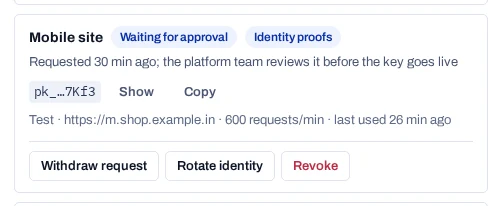
The key shows Waiting for approval. It stays a test key until the review is done.
To take the request back, choose Withdraw request and confirm. You can ask again at any time.
The Install set-up step follows the same states. For a website it reads No live key for this site until a key with the site's origins is live.
After the review#
Approved. The badge changes to Live. The key string is the same, so nothing has to be reinstalled. From then on the key writes live records. A key on the default rate limit moves to 6,000 requests a minute.
Declined. The key shows Declined with the reviewer's reason. It keeps working as a test key. Fix what the reason names, then choose Request to go live again.
A live key stops working on localhost
Once a key is live, it answers browsers only on its listed origins. Keep a separate test key for local development. A live key with no origins works only from a server, with its secret.
On your own deployment, the operator reviews the request. See Approve live keys.