

Read the audit log
Find who changed or viewed what in the console and when, filter the log, and know what it records and what it does not.
Use the audit log to answer "who changed or viewed what, and when?" for the console. It lists every change made in the project and each read of personal data.
Find an entry#
- Open Audit.
- Scroll past Evidence anchors and the breach register to the log.
- Narrow the list with the filters in the table below.
- Click a line to see its detail.
Each line shows When, the Action, the Area, Who, the Target and the Result. The result is OK, or Failed with a status. The log shows 50 entries at a time, newest first.
The detail adds the address the action came From, the Client (the browser used), the Chain position and the Recorded detail.
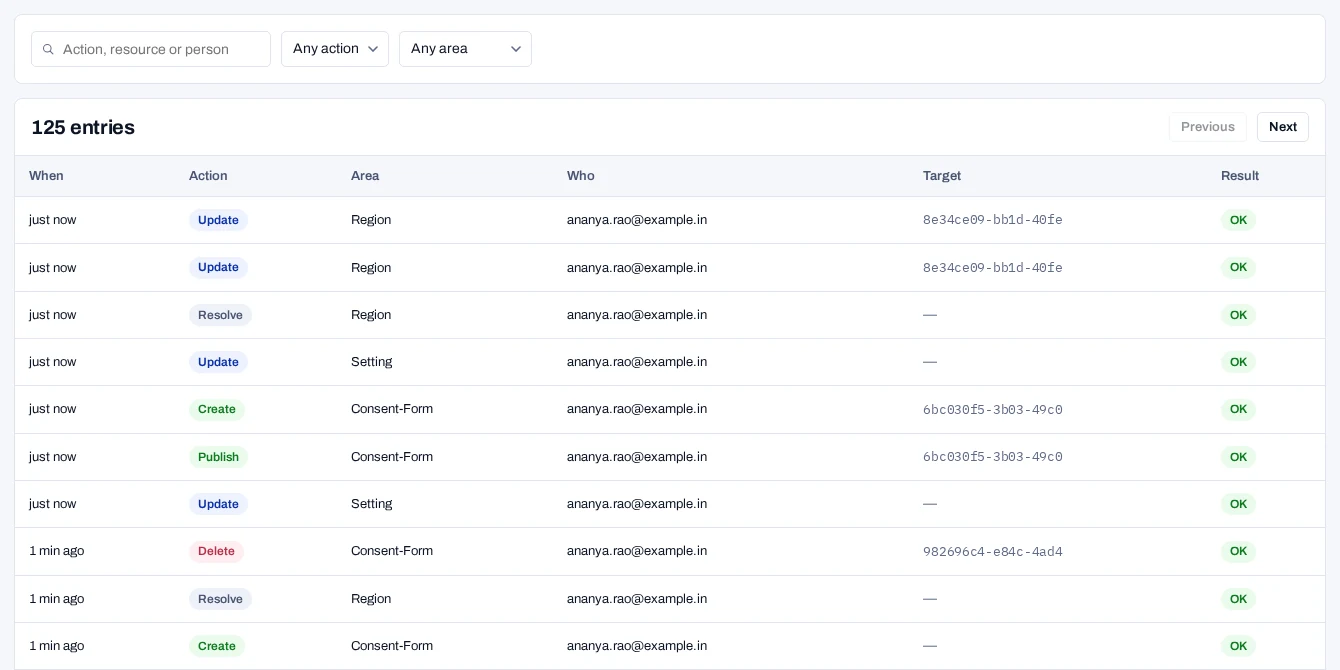
| Filter | Choices |
|---|---|
| Action, resource or person | Type part of an action, an area or an email address. |
| Any action | Created, Updated, Published, Deleted, Revoked, Withdrawn, Erased, Exported, Viewed, Looked up, Closed, Issued, Replayed, Recorded a report, Verified, Placed a hold, Released a hold or Sent to your systems. |
| Any area | Consent forms, Regions, Purposes, Policies, Keys, Webhooks, Records, Requests, Settings, Audit log, Consent imports, Notice campaigns, Processors, Processor reports from the API, Breaches, Legal holds or Significant Data Fiduciary. |
What is recorded#
- Every console change: what was done, by whom, from where, and whether it worked.
- Each read of personal data: opening a record or a rights request, a receipt export and a download of this log. A person search counts too, in Records or with Find a person in a notice campaign. It is recorded with the first 12 characters of the identifier's hash, never the identifier.
- Each export of a property, and each export from a notice campaign.
- Each reveal of a key, including the subject fingerprint key.
- A change that was refused or failed. It is shown as Failed.
- Actions taken without a person. They show System under Who.
System actions include automatic deletions under Keep evidence for, and notice links issued by the job. They also include calls your servers make with a secret key: on a person's records, reading notice links, reporting processor tasks, or running out of the consent check budget. Such a call is recorded with the key's name, never with the identifier.
A download made with a search records that it was searched, never the search text. List views are not recorded, and nor are personal dashboards: saving, changing or deleting one, and the chart queries the Overview sends.
The audit log and the proof chain#
Two logs are kept. The audit log holds what your team did. Each consent record holds its own consent events, sealed in its proof chain.
A console action that changes a record, such as a withdrawal or an erasure, appears in both. Choose What is recorded on the page for the console's own summary.
Limits of the log#
The audit log is append-only and sealed
The database refuses changes and deletions of entries. Each entry is also sealed to the one before it, with a key kept outside the database. Verify the audit log shows any change. Download the log or stream it to your SIEM for an independent copy.
- The product never deletes entries from it.
- A console change waits for its entry. If the entry cannot be stored, the change still goes through. Its reply carries
X-Audit-Log: not-stored, and the console warns Done, but the audit log could not record it. The entry is counted inaudit_log_write_failures_totaland kept on the API's standard output.