

Register your processors
Mark which partners on your purposes are Data Processors, with their contact and the days they have to stop and to erase.
The register says what each partner on your purposes is to you. Only partners you register as Data Processors get a task to stop or erase when a person withdraws, a consent expires or a person is erased.
Before you start#
- The partners are named on your purposes. See Add partners.
- You know from your contracts which partners process data on your behalf. That is your legal call: the product does not classify anyone for you.
Classify a partner#
- Open Properties and choose Processors.
- Choose Register. Every partner on a purpose is listed, with Not classified until you classify it.
- On the partner's row, choose Classify.
- Choose the Role: Data Processor or Independent recipient.
- Set Stop within (days) and Erase within (days), and fill in the other fields you know.
- Choose Save.
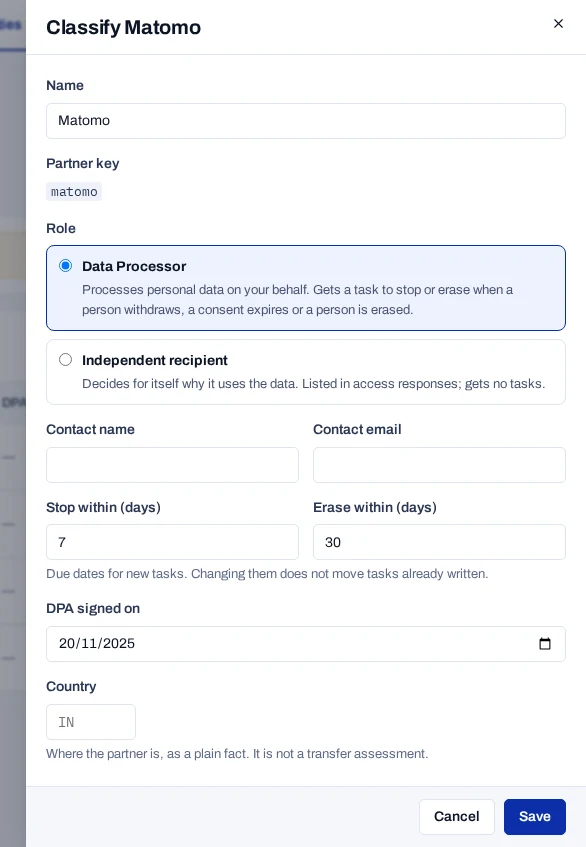
To change an entry, choose Edit on its row. To take a partner out, choose Remove from register: tasks already written stay, and new ones are not written for it.
The fields#
| Field | Meaning |
|---|---|
| Name | The partner's name, as you want it in tasks and webhooks. |
| Role | Data Processor processes personal data on your behalf and gets tasks. Independent recipient decides for itself why it uses the data. It is listed in access responses and gets no tasks. |
| Contact name, Contact email | Whom you send instructions to. |
| Stop within (days) | Days after a withdrawal, a change or an expiry by which the processor should stop. 7 unless you set it, 1 to 365. |
| Erase within (days) | Days after an erasure by which the processor should erase. 30 unless you set it, 1 to 365. |
| DPA signed on | The date of your data processing agreement, if you record it. |
| Country | Where the partner is, as a two-letter code such as IN. |
Changing the days does not move tasks already written. The register travels with a property's export and import.
What the register is not#
- It is not a vendor risk or due-diligence register. It holds what tasks need, nothing more.
- Country is a plain fact. It is not a transfer assessment.
- Partners are matched by their key on the purpose. A partner no longer on any purpose shows Not on any purpose now.