

Verify evidence anchors
Keep your own copy of each day's signed anchor, and check any day against the database as it is now.
An anchor is one signed root for all of a project's consent events on one day. It shows that no event was added, changed or removed after the day closed. Keep your own copy of each anchor, and verify a day when you need to show that.
Keep your own copy#
Each new anchor is sent to your webhooks as evidence.anchored.
- Open Install and add a webhook endpoint with
evidence.anchoredticked. See Manage webhook endpoints. - Ask your developers to store every
evidence.anchoreddelivery in a system you control.
Your copy is what makes anchors independent
Once you hold a day's root, nobody can change that day's events without the check failing against your copy. That includes the people who run the deployment. Without your copy, you trust the deployment's own table.
Verify a day#
- Open Audit.
- Find the Evidence anchors panel at the top. It lists the latest 14 anchored days.
- Choose Verify on the day you want to check.
- Read the result: Matches the database or Does not match the database.
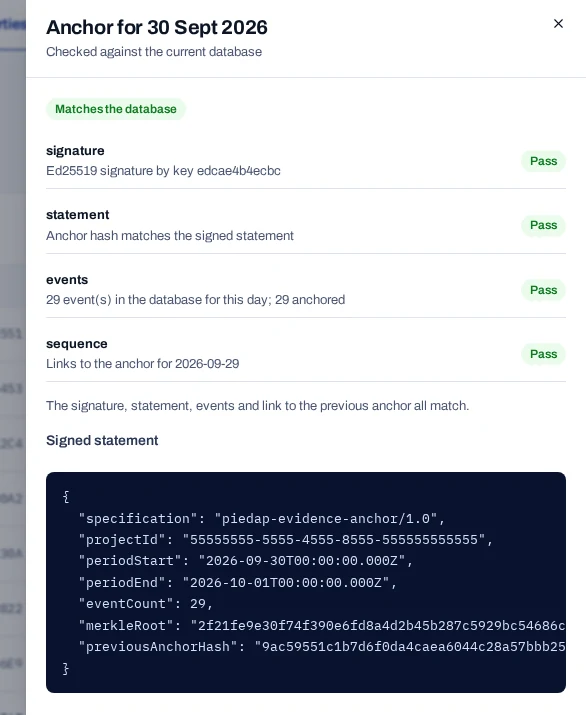
Read the four checks#
Each check shows Pass or Fail.
| Check | A pass means |
|---|---|
signature |
The anchor was signed by the deployment's signing key. |
statement |
The anchor hash matches the signed statement. |
events |
The day's events in the database give the same root and the same count. |
sequence |
The anchor links to the anchor before it. |
If events fails, data from that day changed after it was anchored. Compare the anchor with the copy your webhook received.
A day anchored by an earlier version can show Matches the database with a note: it was sealed by an earlier version that did not seal identifier links. Its events check leaves out the identifier links of that day, because the anchor never covered them. The note does not mean that data changed.
If signature fails, the signing key was likely changed after the anchor was made. On your own deployment, see Rotate secrets.
Public keys, in the same panel, opens the published keys that anyone can use to check a signature.
When a day has no anchor#
- A day is anchored shortly after it closes, at 00:15 UTC. Today's events are covered by tomorrow's anchor.
- A day with no sealed events has no anchor.
- To anchor closed days without waiting, choose Anchor closed days now.
Test records are anchored like live ones. Records deleted later do not break an anchor.