

Close a project
Export a project's data, then schedule its deletion at the end of your contract, with a date you can cancel until.
Close a project when your contract ends and its data must go. You export first, then schedule the deletion. Only an owner can close a project.
Before you start#
- You are an Owner of the project. See Access and roles.
- Export each property with its records. See Export and import a property.
- Download the audit log if you need your own copy. See Download the audit log.
The property export does not hold rights requests, the breach register or project settings. Copy what you must keep from those pages first.
Schedule the deletion#
- Open Settings.
- In the Close this project panel, choose Close this project.
- Tick I have exported what I need, then choose Next.
- Check the rows listed under Step 2 of 2: check what is deleted.
- Type the project name to confirm.
- Choose Schedule the deletion, then confirm.
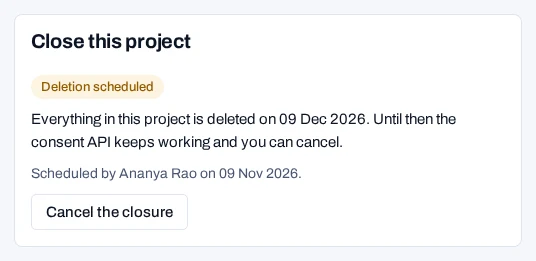
The panel then shows Deletion scheduled and the date. The consent API keeps working until that date.
Time limits#
| Step | When |
|---|---|
| Export | Before you schedule. Nothing can be recovered after the deletion |
| Deletion | 30 days after you schedule, unless the operator set PROJECT_DELETION_DAYS |
| Cancel | Any time before the deletion starts |
| Deletion job | Daily at 02:30. A large project may take more than one run |
| Webhook endpoints | Removed once project.deleted is delivered, or 7 days after the deletion |
| Backups | Gone once the last backup taken before the deletion expires. scripts/backup.sh keeps backups for BACKUP_KEEP_DAYS days; unset, it keeps them all |
The operator's period is shown in the panel. A closure keeps the period it was scheduled with.
Two webhook events tell your systems. project.closing is sent when you schedule or cancel. project.deleted is sent when the data is gone. See Law and project events.
What is deleted and what is kept#
The job deletes every row the project holds, table by table. That covers consent records and their events, forms, purposes, policies, region rules, keys, rights requests, campaigns and settings. It first turns the project's keys off.
Three things are kept:
- The audit log. It cannot be changed or deleted. It records the closure and the deletion.
- The closure itself. It records when it was asked for and how many rows went.
- Legal holds. While a hold is in force, the deletion waits. It runs on the first day after the last hold is released.
Cancel the closure#
- Open Settings.
- In the Close this project panel, choose Cancel the closure.
Nothing is deleted. A closure that waits on a legal hold can still be cancelled.
Related#
- Export and import a property, to keep a copy first
- Change project settings
- Scheduled jobs
- Access and roles