

Download the audit log
Download the project's audit log for a range of days as CSV or JSON lines, and archive old entries.
Download the audit log to keep a copy for an auditor or your own archive. Each download covers whole days in UTC.
Download a range#
- Open Audit.
- To download only some entries, set the filters above the list first.
- Choose Download.
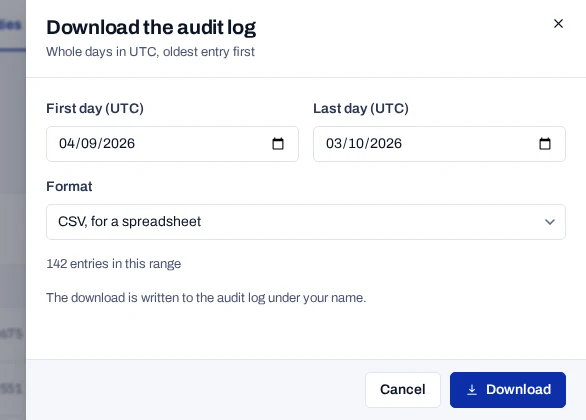
- Set First day (UTC) and Last day (UTC). The last 30 days are set for you.
- Choose a Format: CSV, for a spreadsheet or JSON lines, for a SIEM.
- With filters set, keep Only entries that match the filters above the list ticked, or clear it for every entry.
- Choose Download.
The panel counts the entries in the range before you download. The console then says Audit log downloaded.
What the file holds#
- Entries oldest first, in a file named
audit-log-<first day>_<last day>.csvor.jsonl. - The CSV has 16 columns:
id,createdOn,action,resource,resourceId,userId,userEmail,organizationId,accountId,projectId,ipAddress,userAgent,method,path,statusCodeanddetails. A cell a spreadsheet would run as a formula starts with an apostrophe. - A JSON lines file holds one entry per line, with the fields of an audit entry.
- The download is itself an entry, under your name, with the days and format. A search is recorded as
searched: true, never its text.
Remove old entries#
The product never deletes audit entries. The database refuses changes and deletions through a trigger, which stops the application and accidental changes. The table's owner can still turn the trigger off or drop it, so on your own deployment you can archive and remove old entries.
- Download the range you are about to remove, and store the file.
- Choose Verify the log for the same days, and store the hash of the last entry with the file.
- As the owner of the
audit_logtable, run the statements below in one transaction.
BEGIN;
ALTER TABLE audit_log DISABLE TRIGGER audit_log_append_only;
DELETE FROM audit_log WHERE "createdOn" < '2025-10-01T00:00:00Z';
ALTER TABLE audit_log ENABLE TRIGGER audit_log_append_only;
COMMIT;
New entries wait until the commit, so none is written while the trigger is off. Later checks of the whole log report the entry before the oldest one kept as missing. That is expected after an archive.
Limits#
- Once roles are on, only an owner, a privacy officer or an auditor can download the log. A project can also make each download wait for a second person. See Access and roles.
- One file covers at most 366 days.
- A write that fails is counted in
audit_log_write_failures_totaland kept on standard output. See Monitor a deployment. - Each entry is sealed to the one before it, but the file does not carry the seals. See Verify the audit log.