

Receive your first webhook
Run a small receiver, add it as an endpoint in the console, and watch a signed consent event arrive and pass its signature check.
A webhook is a signed message the service sends to your server when something happens. Run a small receiver on your machine, add it as an endpoint, and watch an event arrive when someone answers your banner. It takes about 15 minutes.
Before you start#
- The test page from Put a banner on a test page, served at
http://localhost:8080as in that tutorial. - Node.js 18 or later.
Write the receiver#
In a new folder, install Express and the SDK. Your deployment serves the package.
npm install express \
https://console.dpconsent.com/consent/sdk/v1/packages/piedap-consent-1.0.7.tgzimport express from 'express';
import {
SIGNATURE_HEADER,
TIMESTAMP_HEADER,
verifyWebhook,
} from '@piedap/consent/server';
const app = express();
const seen = new Set();
const raw = express.raw({ type: '*/*', limit: '1mb' });
app.post('/webhooks/piedap', raw, (req, res) => {
const ok = verifyWebhook({
payload: req.body,
signature: req.get(SIGNATURE_HEADER),
timestamp: req.get(TIMESTAMP_HEADER),
secret: process.env.PIEDAP_WEBHOOK_SECRET,
});
if (!ok) return res.status(401).end();
const event = JSON.parse(req.body.toString('utf8'));
if (!seen.has(event.id)) {
seen.add(event.id);
console.log(event.type, event.data.consentId, 'test:', event.test);
}
res.json({ received: true });
});
app.listen(4817);What the receiver does:
express.rawkeeps the body as the exact bytes that were signed.verifyWebhookchecks the signature, and refuses a delivery more than 300 seconds from your clock.seendrops a repeat. Every retry of an event carries the sameid.- It answers with a
2xxstatus. A delivery counts as made when the answer comes within eight seconds.
Open a tunnel#
Webhooks are delivered only to an address on the public internet. A tunnel gives your machine one.
npx --yes localtunnel --port 4817The tunnel prints a public address. Copy it, and leave the tunnel running.
Add the endpoint#
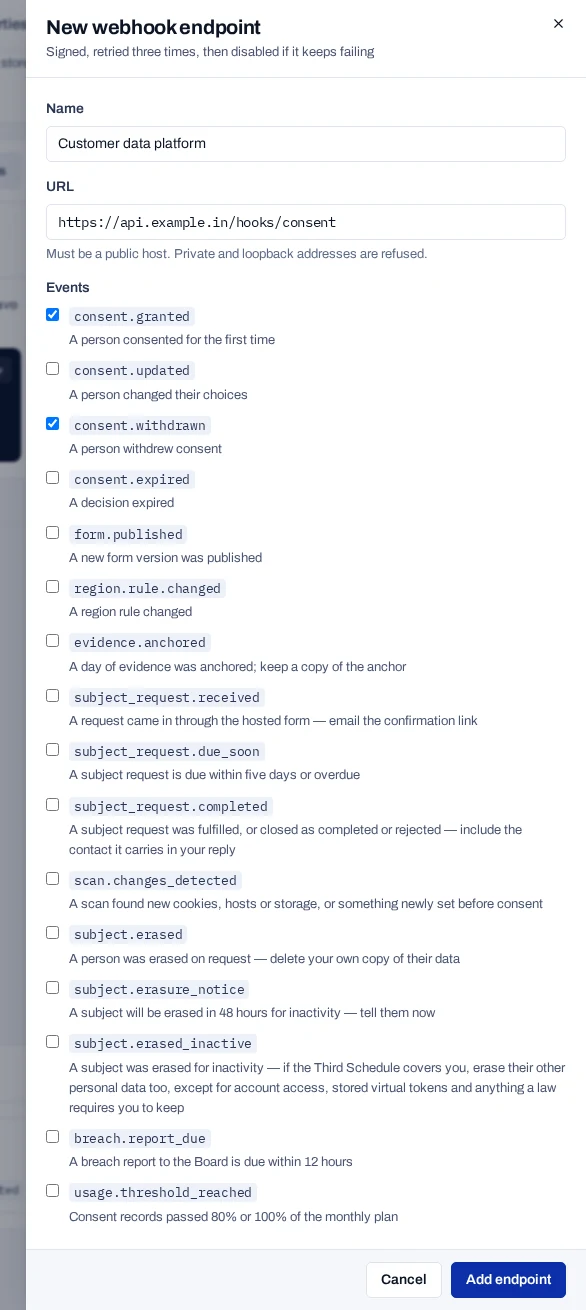
An endpoint is an address the service sends webhooks to.
- In the console, open Install and scroll to the Webhooks panel.
- Choose Add endpoint.
- Under Name, type
Local receiver. - Under URL, type the tunnel address followed by
/webhooks/piedap. - Under Events, leave
consent.grantedandconsent.withdrawnticked. - Choose Add endpoint.
- In Endpoint created, copy the Signing secret. It is shown only once.
The endpoint is listed in the Webhooks panel with an Active badge. Endpoints belong to the whole project, so it receives events from every property.
Start the receiver#
In a second terminal, start the receiver with the signing secret.
export PIEDAP_WEBHOOK_SECRET=whsec_…
node receiver.mjs
The receiver prints nothing until an event arrives.
Send an event#
- Open your test page at
http://localhost:8080. - In the browser console, run
await PiedapConsent.reset(). The banner appears again. - Choose Accept all.
- Run
await PiedapConsent.withdraw()in the browser console.
The receiver prints one line for each event:
consent.granted cns_3f9a1c0e5b7d4a2c9e8f6b1d0a7c5e42 test: true
consent.withdrawn cns_3f9a1c0e5b7d4a2c9e8f6b1d0a7c5e42 test: true
consent.granted is sent for a person's first answer on a form, whatever the answer. test is true because a test key wrote the record. Use the flag to keep test events out of systems that act on real people.
Check the deliveries#
- In the Webhooks panel, choose Recent deliveries.
- Find the two lines for your events.
Each line shows the event, your server's answer as HTTP 200, the time and the consent id. No response means the service could not reach your receiver. HTTP 401 means the receiver has the wrong signing secret. For anything else, see Webhook problems.
Next steps#
- Receive webhooks covers retries, duplicates and events that arrive out of order.
- Verify webhook signatures shows the check in Python, PHP and other languages.
- Match events to your users tells you whom an event is about.
- Consent events lists the fields of each event.
- Manage webhook endpoints covers the console side.