

Receive webhooks
Add a webhook endpoint, write a receiver that checks each delivery and handles it once, and plan for retries and events out of order.
A webhook is a message the service posts to your server when something happens: consent is given or withdrawn, a person is erased, a rights request arrives. Use webhooks to keep your own systems in step, such as stopping messages the moment someone withdraws.
Before you start#
- A route on your server that the internet can reach, over HTTPS. Addresses on localhost or a private network are refused.
- Access to Install in the console. Webhook endpoints covers the console side.
Add the endpoint and the receiver#
-
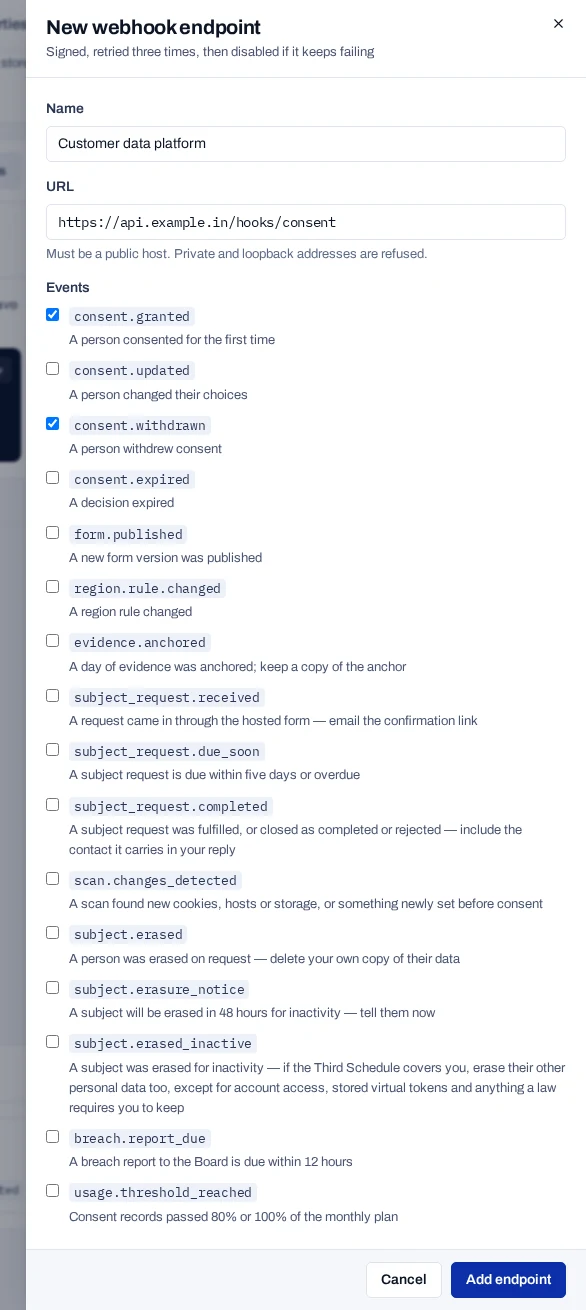
In the console, open Install → Webhooks and choose Add endpoint.
-
Enter a name and the address of your route, and tick the events to send. An endpoint receives only the event types you tick.
-
Copy the Signing secret,
whsec_…, into your server's secrets asPIEDAP_WEBHOOK_SECRET. It is shown once. -
On your server, add a route that reads the raw body, checks the signature and handles each event
idonce.Node.jsJavaScript import express from 'express'; import { SIGNATURE_HEADER, TIMESTAMP_HEADER, verifyWebhook, } from '@piedap/consent/server'; const app = express(); const seen = new Set(); // use a database table in production const raw = express.raw({ type: '*/*', limit: '1mb' }); app.post('/webhooks/piedap', raw, (req, res) => { const ok = verifyWebhook({ payload: req.body, signature: req.get(SIGNATURE_HEADER), timestamp: req.get(TIMESTAMP_HEADER), secret: process.env.PIEDAP_WEBHOOK_SECRET, }); if (!ok) return res.status(401).end(); const event = JSON.parse(req.body.toString('utf8')); if (seen.has(event.id)) return res.sendStatus(200); seen.add(event.id); switch (event.type) { case 'consent.withdrawn': case 'consent.expired': stopMessagesFor(event.data.consentId); break; case 'subject.erased': case 'subject.erased_inactive': deleteOwnCopyFor(event.data.consentId); break; } res.sendStatus(200); }); app.listen(4817);Python import json import os from flask import Flask, request from piedap_consent import ( SIGNATURE_HEADER, TIMESTAMP_HEADER, verify_webhook, ) app = Flask(__name__) seen = set() # use a database table in production @app.post("/webhooks/piedap") def piedap_webhook(): raw_body = request.get_data() ok = verify_webhook( raw_body, request.headers.get(SIGNATURE_HEADER), request.headers.get(TIMESTAMP_HEADER), secret=os.environ["PIEDAP_WEBHOOK_SECRET"], ) if not ok: return "", 401 event = json.loads(raw_body) if event["id"] in seen: return "", 200 seen.add(event["id"]) if event["type"] in ("consent.withdrawn", "consent.expired"): stop_messages_for(event["data"]["consentId"]) elif event["type"] in ("subject.erased", "subject.erased_inactive"): delete_own_copy_for(event["data"]["consentId"]) return "", 200 -
Answer with a
2xxstatus within eight seconds. If the work is slow, store the event, answer, and do the work afterwards.
stopMessagesFor and deleteOwnCopyFor stand for your own code.
Every delivery has the same outer shape:
{
  "id": "4f1c2b9e-7d0a-4c55-9a51-2d8e6f0b3a17",
  "type": "consent.withdrawn",
  "createdOn": "2026-09-24T10:12:03.412Z",
  "projectId": "c2a6f0de-51b3-4f0a-9d7e-8b1f3a6c4e90",
  "test": false,
  "data": {}
}
test is true when the event is about a record written with a test key. Use it to keep test events out of systems that act on real people.
Events to act on#
| Event | What to do |
|---|---|
consent.granted |
A record was created, whatever the answer. Read data.status before you act. |
consent.withdrawn, consent.expired |
Stop the processing that relied on the consent. Pass data.processors on to your Data Processors. |
campaign.withdrawn |
A person withdrew on a notice link. Stop processing their data. |
consent.imported |
An import from a file ended. It stands for every record it wrote: no event is sent for each one. |
propagation.overdue |
A processor has tasks past their due date. Follow it up. |
subject.erased, subject.erased_inactive |
Delete your own copy of the person's data, and pass data.processors on. |
subject.erasure_notice |
Tell the person now. They are 72 hours from being erased for inactivity. |
subject_request.received |
Email data.verificationUrl and data.statusUrl to data.replyTo. |
subject_request.completed |
Email data.reply and data.statusUrl to the person. |
subject.rectification_requested |
Correct, complete or update the person's data in your systems. |
policy.published |
When data.changeType is MATERIAL, ask the people behind data.affectedFormIds again, or tell them. |
project.closing |
Stop sending data to the project before data.deleteOn, unless data.status is CANCELLED. |
The fields of each event are in Consent events, People events, Campaign events, Other events and Law and project events. How to pass instructions on is in Pass instructions to processors.
Plan for retries and order#
A delivery counts as made when your endpoint answers 2xx within eight seconds. Anything else, a redirect included, is tried again: seven attempts over about 21 hours.
- Duplicates happen. Every attempt carries the same
id. Keep the ids you have handled and skip an event you have seen. - Order is not guaranteed. Make each action safe to repeat, and treat
subject.erasedas final. - When in doubt, read the record again with
getConsent. The API is the source of truth.
An endpoint that keeps failing is turned off
After ten events in a row have each failed all seven attempts, the endpoint is turned off. Its events are then kept as failed for 30 days. Turn it back on in the console, then replay them from Failed events under Webhooks on Install.