

Webhook problems
Fix webhooks that do not arrive, fail the signature check, time out, arrive twice or out of order, or have switched their endpoint off.
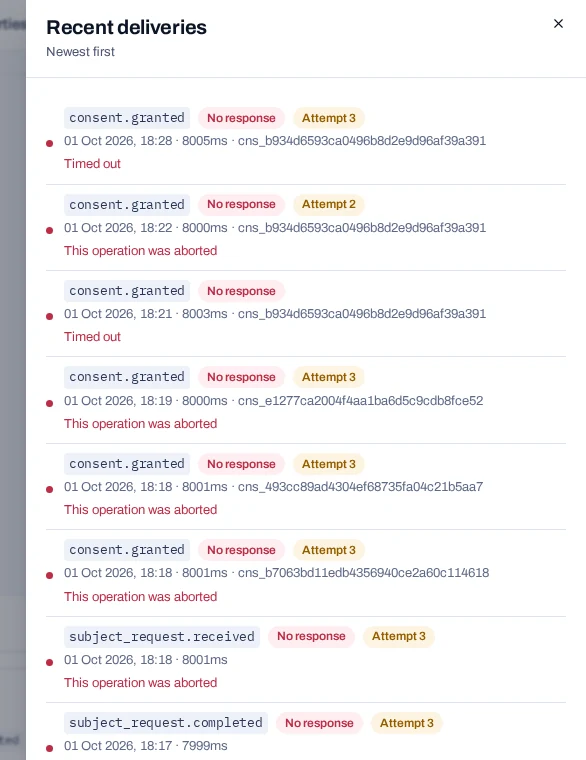
Find the problem by what you see. Start in the console: open Install, scroll to Webhooks and choose Recent deliveries. It lists the latest 40 attempts with your server's answer.
No deliveries arrive#
What you see: Something happened, such as a withdrawal, but Recent deliveries shows no attempt for it.
Why it happens: An event is sent only to endpoints that are active and subscribed at that moment.
- The endpoint is not subscribed to that event. Only
consent.grantedandconsent.withdrawnare ticked to start with. - The endpoint shows Disabled.
- The endpoint was added after the event happened.
Fix: Check the events listed on the endpoint. An endpoint's events cannot be changed: delete it and add it again with the events you need. The new endpoint gets a new signing secret. See Manage webhook endpoints.
The signature check fails#
What you see: Your receiver refuses real deliveries, and Recent deliveries shows the failures.
Why it happens: The signature covers the timestamp, a full stop and the exact bytes of the body.
- Your framework parsed the JSON and you turned it back into text. Spaces and key order changed.
- The secret belongs to another endpoint. Each endpoint has its own
whsec_secret. - Your server's clock is more than 300 seconds out.
Fix: Read the raw body before any JSON parser touches it. In Express, use express.raw({ type: '*/*' }) on the webhook route. Check the secret and keep the clock in step. See Verify webhook signatures.
Deliveries show No response#
What you see: A line in Recent deliveries shows No response, or a status outside 200 to 299, followed by Attempt 2 and later attempts.
Why it happens: A delivery counts only when your server answers 2xx within eight seconds. A redirect, a timeout or a connection error is a failure and is tried again.
Fix: Answer first and work afterwards: store the event, answer 200, then do the slow work. Do not redirect the webhook address. A failed delivery is tried again six times, over about 21 hours. See Receive webhooks.
The endpoint shows Disabled#
What you see: The endpoint has a Disabled badge and receives nothing. Before that, it showed a badge such as 3 failures.
Why it happens: Ten events in a row each failed all seven attempts, so the endpoint was turned off. Events that happen while it is off are kept as failed for 30 days.
Fix: Fix the receiving server, then turn the endpoint on with its switch. That clears the failure count. Then send the events again from Failed events in the Webhooks panel. See Replay failed webhooks.
The same event arrives twice#
What you see: Your server handles one event more than once.
Why it happens: If your server did the work but answered too late, the event is sent again. Every attempt carries the same id.
Fix: Store the id of each event you handle and skip one you have seen. Make each action safe to repeat. See Receive webhooks.
Events arrive out of order#
What you see: An older event arrives after a newer one for the same record. For an erased person, subject.erased can arrive before consent.withdrawn.
Why it happens: Events are queued one by one and retried on their own schedules. Order is not guaranteed.
Fix: Compare data.collectedOn and data.withdrawnOn with what you last stored, and keep the newer state. Treat subject.erased and subject.erased_inactive as final. When in doubt, read the record again with getConsent. See Receive webhooks.
Test events reach live systems#
What you see: A consent you gave while testing changes a live system, such as your marketing list.
Why it happens: Test and live events go to the same endpoints. An event about a record written with a test key carries "test": true.
Fix: Read the flag after the signature check and stop there for test events. See Test your integration.
const event = JSON.parse(req.body.toString('utf8'));
if (event.test) {
  return res.sendStatus(200);
}
The endpoint address is refused#
What you see: Add endpoint fails with WEBHOOK_URL_NOT_PUBLIC, WEBHOOK_URL_NOT_ALLOWED or PRIVATE_NETWORK_UNAVAILABLE.
Why it happens: Addresses on localhost or a private network are refused unless whoever runs the deployment listed that network in PRIVATE_NETWORK_ALLOWLIST. Even then, the endpoint needs Private network address on. Cloud metadata addresses are never allowed.
Fix: Use a public https:// address. For local development, expose your machine through a tunnel; see Receive your first webhook. For a receiver on your own network, ask the operator to list it, then turn on Private network address.
A processor task shows Overdue#
What you see: The Processors page or the console's status line shows overdue tasks, and propagation.overdue arrives once a day.
Why it happens: A processor's task passed its due date with nothing reported. The product records reports; it cannot see what the processor did.
Fix: Ask the processor, then record what it reported, in the console or with POST /sdk/v1/processor-tasks/acknowledge. If the due days are wrong, change them in the register; tasks already written keep their date. See Follow up processor tasks.
You cannot tell whose event it is#
What you see: An event arrives, but nothing in it matches a user in your system.
Why it happens: The product does not know your users. A record made by the banner for a visitor who is not signed in is kept under a random browser id. subject.erasure_notice and subject.erased_inactive carry no fingerprint.
Fix: Store consentId next to the user when you record consent, then look up data.consentId. Or compare data.subject.fingerprint with a fingerprint you compute. See Match events to your users.
The signing secret is lost#
What you see: You need the whsec_ secret again, and the console does not show it.
Why it happens: The secret is shown once, when the endpoint is created. It cannot be shown again or changed.
Fix: Delete the endpoint and add it again to get a new secret. Update your server in the same change. See Manage webhook endpoints.
Still stuck#
Collect these before you ask for help:
- the endpoint's name and address
- the line from Recent deliveries: the event, the status, the time and the attempt number
- the
idof the event, from its body - the start of your server's reply, shown in red for a failed delivery