

Put a banner on a test page
Put a consent banner on a local page with a test key, hold one tag until consent, read the choice in JavaScript and find the record.
Put a consent banner on a local page, hold one tag until the visitor agrees, read the choice in JavaScript and find the record. It takes about five minutes. You use a test key, so nothing here counts as live evidence.
Before you start#
- A published consent form, and a region rule that covers the place you test from. If the project has neither, do Set up your first banner first.
- Python 3, or another tool that serves a folder over HTTP.
Get a test key#
- Open the console at https://console.dpconsent.com and go to Install.
- Choose New key.
- Enter a Name, such as
Kaveri Books - local. - Choose Create key.
- In Key created, choose Copy next to Publishable key.
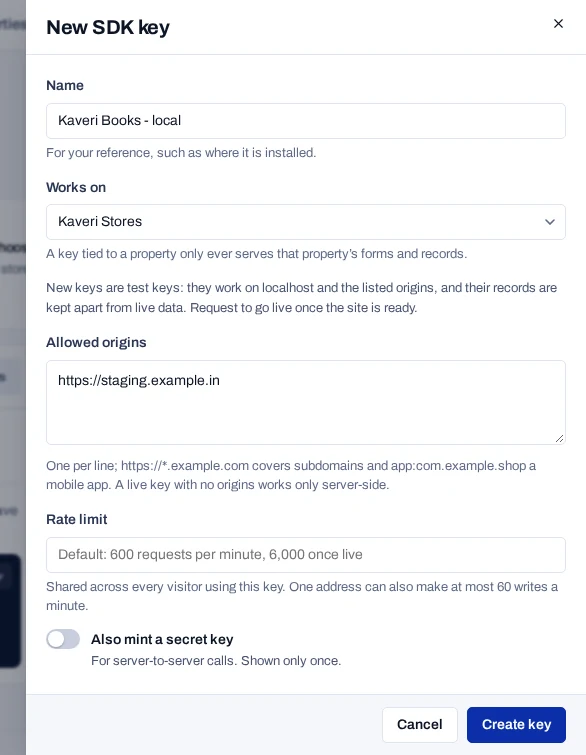
You now have a key that starts with pk_. Every new key is a test key, and a test key works from localhost. The panel also shows an Identity secret, which you do not need here.
Add the runtime to a page#
The runtime is the script that shows the banner and holds tags back. Save this page as index.html, with your key in data-piedap-key. The runtime tag goes in <head> before every other script, without async or defer.
<!doctype html>
<html lang="en">
  <head>
    <meta charset="utf-8">
    <script src="https://console.dpconsent.com/consent/sdk/v1/loader.js"
            data-piedap-key="pk_…"></script>
    <title>Kaveri Books</title>
  </head>
  <body>
    <h1>Kaveri Books</h1>
    <a href="#" data-piedap-open>Privacy settings</a>
  </body>
</html>
Serve the folder over HTTP, because a page opened from disk has no origin and the key refuses it. Run this command in the folder that holds index.html.
python3 -m http.server 8080Open http://localhost:8080. The banner appears. Do not answer it yet.
Hold one tag until consent#
Add this tag to <head>, after the runtime tag. The type text/plain keeps the browser from running it. data-consent names the purpose it waits for.
<script type="text/plain" data-consent="analytics"
        src="https://analytics.example.in/tag.js"></script>
analytics is a purpose key from your form. Open the browser's network panel, then reload the page. No request goes to analytics.example.in.
Read the choice in JavaScript#
Add this script to <body>. PiedapConsent exists anywhere after the runtime tag.
<script>
  PiedapConsent.ready.then(function (consent) {
    console.log(consent.law, consent.consentModel, consent.purposes);
  });

  PiedapConsent.whenGranted('analytics').then(function () {
    console.log('analytics may run');
  });
</script>
Reload the page. The browser console prints the law, the consent model and the purposes. Now choose Accept all on the banner. The console prints analytics may run, and the browser requests the held tag.
See the record#
- In the browser console, run
PiedapConsent.consentId. It returns an id that starts withcns_. - In the product console, open Records and choose Show test records. The list starts on live records only. The record is at the top with a Test badge.
- Open the record to see each purpose, the form version that was shown and its history under What happened.
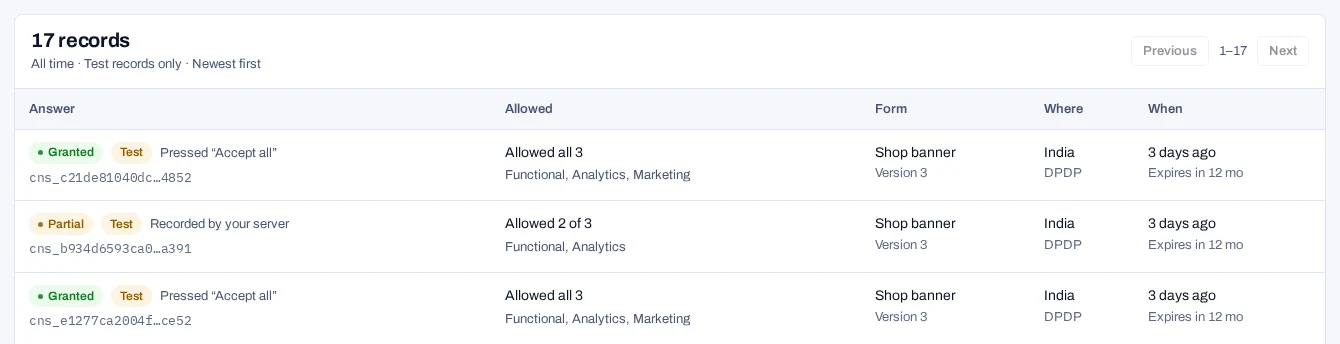
The Privacy settings link on your page reopens the preferences at any time.
If the banner does not appear
| What you see | Why | What to do |
|---|---|---|
GET /sdk/v1/form answers 401 |
The page's origin is not on the key's list, or the page was opened from disk | Serve the page from localhost |
The response has "form": null |
No region rule covers where you are | Add data-piedap-country="IN" to the runtime tag to try a place a rule covers |
No request, and a [piedap-consent] message in the browser console |
The tag has no data-piedap-key, or the key is not a pk_ key |
Fix the attribute |
| No banner, but a round privacy button | This browser already answered | Run await PiedapConsent.reset() |
Banner and tag problems covers more cases.
Next steps#
- Install on a website: the options, pinned versions and the npm package.
- Hold tags until consent: iframes, automatic blocking and partners.
- Browser runtime methods: every method the runtime offers.
- Record sign-up consent from your own server.
- Go live when the site is ready.