

Record and request problems
Fix a person who cannot be found, a missing record, a rights request that will not complete, a receipt that does not verify and records that stay.
Find the problem by what the console shows on Records or Requests.
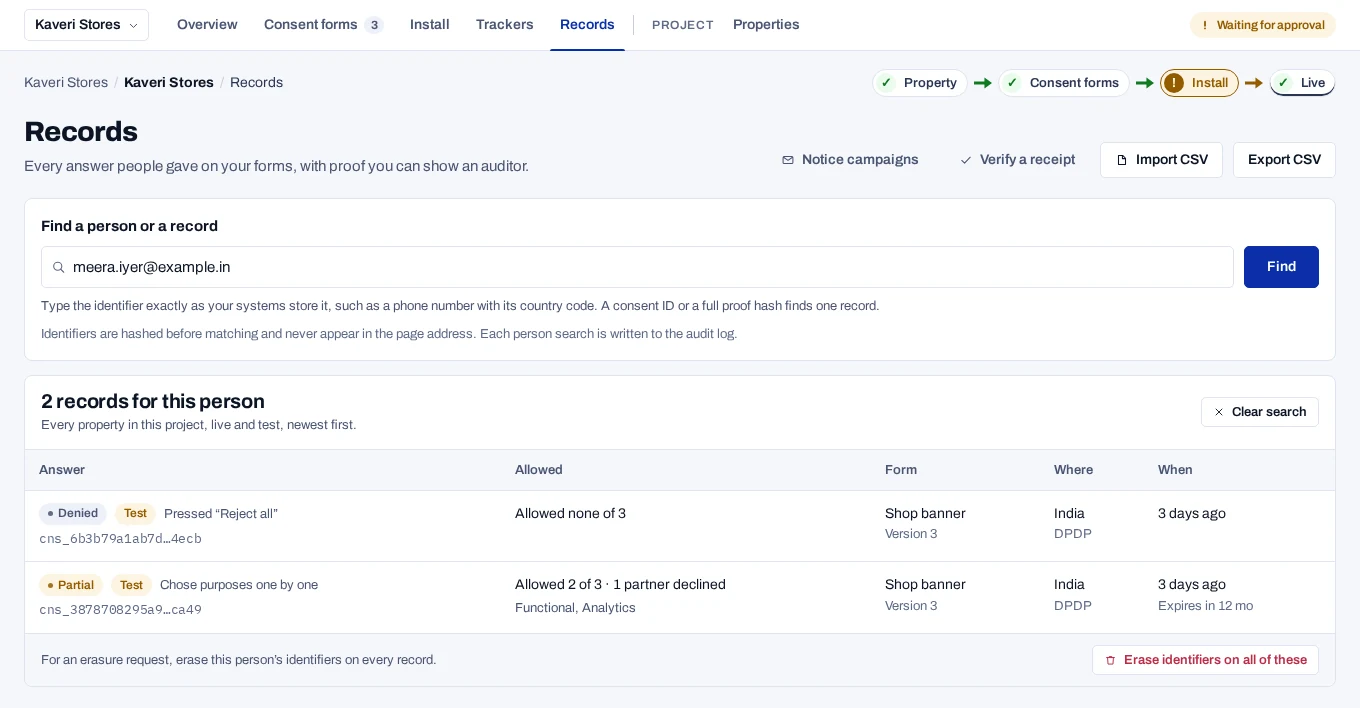
A person search finds no records#
What you see: You search for a person on Records and the page says No records for this person.
Why it happens: The search compares hashes, so what you type must match what your site sent.
- Only an email address is matched in lower case. Any other identifier must be typed in the same upper and lower case.
- The banner keeps a visitor who is not signed in under a random browser id. Without a linked identifier, no email address or phone number finds that record.
- Records imported from another deployment match only when both use the same subject hash pepper.
Fix: Ask your developers which identifier the site records under, and type it exactly. To find banner records by email address or phone number, have the site link identifiers. See Find a person.
A record is missing from the list#
What you see: A record you expect is not on the Records page.
Why it happens: The list is narrower than you think, or the record is gone.
- The page lists the records of the property you have selected.
- The list starts on live records only, so test records are hidden.
- A filter hides it. A search by consent ID keeps the other filters.
- It was a test record. Test records are deleted 30 days after their last change.
Fix: Select the right property. Under More filters, choose Live and test records. To search the whole project for one person, type their identifier in Find a person or a record. See Read a record.
A request stays on Verifying identity#
What you see: A request from the hosted page keeps the badge Awaiting identity confirmation. The console says Can be completed once the person confirms their email.
Why it happens: The product sends no email. It sends the subject_request.received webhook with a confirmation link, and your server emails that link to the person. With no endpoint subscribed to the event, the person never gets the link.
Fix: Add an endpoint that receives subject_request.received and have your server send the link. A request that is stuck cannot be completed, but it can be set to Rejected. After you check who the person is, log the request yourself. A logged request skips this step. See Ways people send a rights request.
A request finds no records#
What you see: The request shows No records match what the person entered.
Why it happens: The person wrote in with one identifier, such as an email address. Your site keeps their consent under another, such as a customer number.
Fix: Open the request and choose Link to your identifier under Subject. Choose the kind, type your identifier for this person and choose Link. Upper and lower case matter for everything except email. See Handle a request.
The person got no reply#
What you see: You chose Export and complete, Erase and complete or Withdraw and complete, but the person received nothing.
Why it happens: No button sends anything to the person. Export and complete downloads the file to your computer. Erase and complete erases consent records only, not data in your own systems.
Fix: Send the reply yourself, with the file if there is one, in a safe way. Your servers delete their own copy of the person's data when subject.erased arrives. See Handle a request.
A receipt does not verify#
What you see: Verify a receipt answers Does not verify, or Paste the whole export: it needs "receipt" and "signature".
Why it happens: The paste is incomplete, the receipt was changed after export, or the deployment's signing key changed after the receipt was made.
Fix: Paste the whole exported file. Then read which check shows Fail: the signature, the links in the chain or a daily anchor. If only the signature fails on an older receipt, ask the people who run your deployment whether the signing key changed. See Verify a receipt.
A record's proof does not match#
What you see: An open record says Changed outside its recorded history or Cannot be checked here. Under Technical proof, Proof chain reads Chain broken or Key not held here.
Why it happens: Cannot be checked here means an event was sealed with a key this deployment does not hold. Changed outside its recorded history means an event does not follow the one before it, or the record no longer matches its seal.
Fix: Hover over the verdict to read the reason. Then tell the people who run your deployment. See a record's chain key is not held and an anchor does not match the database.
A record expired sooner than expected#
What you see: A record shows Expired before the form's validity period is over.
Why it happens: A form and each purpose have their own lifetime. A record expires at the earliest of them, among the purposes the person allowed.
Fix: Compare How long a decision stays valid on the form with How long a decision on this lasts on each purpose. See Write the notice.
Old records are not deleted#
What you see: Records older than Keep evidence for are still listed.
Why it happens: Records are deleted automatically only where retention enforcement is on. A record whose consent is still in force is never deleted. No record is deleted less than a year after it was last processed or exported.
Fix: Ask the people who run your deployment whether retention enforcement is on. See Record retention.
Inactivity erasure erases nobody#
What you see: Erase after inactivity is on, but nobody is erased.
Why it happens: Nobody is erased until they can be told first. If no active endpoint receives subject.erasure_notice, nothing is erased.
Fix: Add an endpoint subscribed to subject.erasure_notice. Your systems then tell the person. See Erase people after inactivity.
Rows are skipped when importing#
What you see: A check or an import lists rows under Skipped, such as A newer answer is already on record.
Why it happens: The records already say more. An import never replaces a newer answer, a withdrawal or an erasure, under any identifier the row names or links. A row imported before is skipped as Already imported.
Fix: Nothing, in most cases. To correct a record that an import got wrong, withdraw it, or record a newer answer. See Consent import file.
Phone numbers are refused in an import#
What you see: Rows fail with Phone number not in international format, or A spreadsheet turned this value into a number.
Why it happens: An import takes phone numbers only in E.164. A spreadsheet may also have turned the column into numbers, such as 9.19876E+11.
Fix: Format the column as text, write numbers as +919876543210, and save the file as CSV UTF-8 again.
A person says the notice link has expired#
What you see: A person opens a notice campaign link and sees Link expired or Link replaced.
Why it happens: Links last 60 to 90 days, and a newer batch replaces a person's earlier link.
Fix: Send the latest link again. If it has expired too, choose Issue new links on the campaign. The person can always withdraw through your contact or the request form. See Track a notice campaign.
A notice opens in the wrong language#
What you see: A person's notice page is in another language than the one you meant.
Why it happens: The page uses the language from the person's row, if the notice is published in it. Otherwise it uses the campaign's Default language.
Fix: Publish a version in that language. Before a campaign's first links, choose Use version under Edit campaign; after them, start a new campaign. The person can also switch to a language the version has.
A notice link was reported as phishing#
What you see: A mail or SMS filter flags or blocks your notice links.
Why it happens: The links point at a domain your customers do not know.
Fix: Set a Link address on your own domain and forward it to the deployment. See Send notice links from your own gateway.
Delivery counts look low#
What you see: Delivered, reported by your sender is lower than Sent a link.
Why it happens: Delivery counts are what your sender's reports said. Links with no report count as neither delivered nor failed.
Fix: Upload the full delivery report from your mailer or SMS gateway, with the link id of each message.
Still stuck#
Collect these before you ask for help:
- the consent id, which starts
cns_, or the request's reference, such asDSR-2026-4F2A91 - the project id, from Scope in Project settings
- what the proof verdict or the failed check says
Do not send the person's email address or phone number.