

Keys and where to use them
What the publishable key, the secret key and the identity secret are for, where each one belongs, and how scopes limit a secret key.
Every call to the consent API carries a key. One key holds up to three credentials, and each belongs in a different place. Choose by where your code runs: a publishable key in pages and apps, a secret key on your server.
The three credentials#
You create a key in the console under Install → New key. Its credentials share a name, an origin list and a rate limit.
| Credential | Looks like | Goes in | Used for |
|---|---|---|---|
| Publishable key | pk_ and 32 letters and digits |
Web pages and mobile apps | Showing the form and recording that browser's or app's own choice |
| Secret key | sk_ and 40 letters and digits |
Your servers only | Recording and reading consent for any person, and calls on a person as a whole |
| Identity secret | idv_ and 32 characters |
Your servers only | Signing identity proofs for signed-in visitors |
Every key has a publishable key and an identity secret. A secret key is added only when you ask for one.
The secret key and the identity secret are shown once, in Key created. A lost secret key cannot be recovered, because the service keeps only a hash of it. Create a key has the console steps.
Secret keys stay on your server
Never put an sk_ key or an idv_ secret in a page, an app or a public repository. Anyone who reads it can write consent for any person in the project.
Two more secrets stay on your server and belong to no key: the webhook signing secret, whsec_…, and the project's fingerprint key, sfk_….
Which key a call needs#
| Call | Publishable key | Secret key |
|---|---|---|
| Fetch the form for a visitor | Yes | Yes |
| Record, change or withdraw one consent record | Yes, under the id the browser or app made. Under a real identity only with an identity proof | Yes, under any identifier |
| Read one consent record | Yes, without your own metadata |
Yes, with metadata |
| Start an email double opt-in | No | Yes |
| Report a person's activity | No | Yes |
| Find, export, withdraw or erase a person | No | Only with the matching scope |
| Check consent; read notice links, processor tasks or the audit log | No | Only with the matching scope |
The browser runtime and the mobile SDKs refuse a key that starts with sk_. The Node.js and Python clients take a secret key only.
curl "https://console.dpconsent.com/consent/sdk/v1/form?country=IN" \
-H "X-Piedap-Key: pk_…"curl "https://console.dpconsent.com/consent/sdk/v1/form?country=IN" \
-H "Authorization: Bearer $PIEDAP_SECRET_KEY"A publishable key can also go in a key query parameter. The identity secret is never sent: your server computes a proof with it, and the page sends the proof.
An unknown or revoked key, or an origin not on the list, gets 401 Unauthorized with no further detail.
Scopes#
Scopes limit what a secret key may do. Every secret key holds the two consent scopes. The others are off until you grant them, when you create the key or later under Scopes on the key.
| Scope | Allows |
|---|---|
consent:read |
Read one consent record and its proof chain |
consent:write |
Record, change and withdraw a record; start an email opt-in; report activity |
subjects:read |
Find a person's records |
subjects:export |
Export a person's records |
subjects:withdraw |
Withdraw everything a person agreed to |
subjects:erase |
Erase a person |
subjects:link |
Link further identifiers to a person's records |
requests:write |
Link a rights request to your identifier |
consent:check |
Check whether a person allows a purpose |
campaigns:links |
Read notice campaign links, for your sender |
processors:read |
Read processor tasks |
processors:write |
Record what processors reported |
audit:read |
Read the project's audit log, with a live key |
Give each key only what its server needs, such as one key for checks only. A call without the scope gets 403 SCOPE_REQUIRED. A publishable key never has these scopes.
Test and live keys#
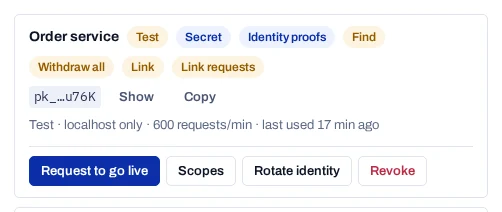
Every new key is a Test key. It becomes live when the platform team approves your request. The key string does not change.
| Difference | Test key | Live key |
|---|---|---|
| Works from | localhost, the origins you list, apps, and clients that send no Origin header, such as curl |
Only the origins and app ids you list |
| Records | Sandbox records marked "test": true, deleted 30 days after their last change |
Live evidence |
| Default request budget | 600 a minute | 6,000 a minute |
Updates, withdrawals and the calls on a person reach only records of the key's own kind. Request go-live has the steps.
Allowed origins#
A publishable key is public: it ships in your page source. The origin list stops another website from using it, because a script cannot change the Origin header a browser sends.
| Entry | Matches |
|---|---|
https://www.example.in |
That exact scheme, host and port |
https://*.example.in |
Every subdomain, but not https://example.in itself |
app:in.example.shop |
A mobile app that sends X-Piedap-App: in.example.shop |
* on its own is refused. A live key with no origins works only through its secret key. A key tied to one property serves only that property's forms and records.
The origin list is fixed when the key is created
A key's origins and rate limit cannot be edited later. To add a site, create a new key that lists it.
When a secret key reaches a browser#
Browsers send an Origin or Sec-Fetch-Site header on calls to another host. A request that carries a secret key with either header is refused with 403 SECRET_KEY_IN_BROWSER.
The key is then marked Exposed in Install, and still works until you revoke it. Create a new key, deploy it and revoke the exposed one.
Each key also has request budgets. See Rate limits.